Azure Hub-and-Spoke Architecture Explained and Automated with OpenTofu

This is my first blog of the new year (2026)! Since being re-awarded as a Microsoft MVP, Microsoft provided me with a fresh set of Azure credits. One of the first things I wanted to do was rebuild my Azure lab environment. This time, I wanted to do it the right way. I wanted it to mirror how I would design and deploy a real enterprise environment, including running fully on private endpoints and following a proper hub-and-spoke network model.

Just as importantly, I wanted everything defined in Infrastructure as Code (IaC) so I could spin environments up and down whenever I needed. That also aligns perfectly with what my team at Jamf is working on right now. We are making some changes to our underlying Azure architecture, including deeper network isolation, security controls, intergration with Jamf security cloud security products, and a shift from Bicep to OpenTofu. We will also be using AI agents to do a lot of the heavy lifting in that refactor. I will be sharing more about that in future blogs and talks as much as I am able to publicly.

Because OpenTofu is at the center of that work, I decided to build my entire Azure lab using OpenTofu and a full hub-and-spoke architecture. This gives my team a real, working reference base implementation that we can build on for production designs. I also want to share this with the larger tech community.

If you are note familiar with OpenTofu it is an open source infrastructure-as-code engine based on Terraform that lets you define, deploy, and manage cloud infrastructure using declarative configuration files, and you can learn more at https://opentofu.org.

You can access the GitHub Repository of my “OpenTofu Azure Hub and Spoke” solution here: https://github.com/Buchatech/OpenTofu-Azure-HubSpoke-public

Lets break down whats in the solution I built.


Solution Architecture

The solution deploys a production-style Azure network and platform foundation that includes:

  • Hub VNet with Azure Firewall, VPN Gateway, and DNS Private Resolver
  • Spoke VNet with peering and default routes through the firewall
  • Key Vault and Azure Container Registry using private endpoints
  • Optional Jumpbox VM for secure management access
  • GitHub Actions CI/CD pipeline using OIDC authentication

How the Automation Works

This is a multi-part solution built around a bootstrap Bash script (bootstrap.sh) and a fully generated OpenTofu repository.

The bootstrap script creates everything you need to get started:

  1. It creates an Azure Storage Account to store your OpenTofu remote state.
  2. It generates a complete OpenTofu project, including modules, variables, and environment structure.
  3. It configures the backend so OpenTofu uses Azure Storage for state.
  4. It creates a ready-to-use GitHub Actions pipeline for CI/CD.

Once the repository is generated, you can deploy your Azure environment by running OpenTofu locally or by pushing the repo to GitHub and letting the pipeline handle deployments for you. Within minutes, you can have a fully functional Azure hub-and-spoke environment up and running, and you can customize the generated modules to fit your own requirements.


Deployment Modes

The bootstrap bash script supports two deployment modes depending on how advanced and locked-down you want the environment to be.

FULL Mode (Default)
This is the enterprise-grade option.

  • Hub VNet with Azure Firewall, VPN Gateway, and DNS Private Resolver
  • Spoke VNet with peering and default route through the firewall
  • Private endpoints for Key Vault and Azure Container Registry
  • Optional Jumpbox VM for secure management
  • GitHub Actions CI/CD pipeline with OIDC authentication

BASIC Mode
This is a simpler version for learning or labs.

  • Hub VNet with Azure Firewall only
  • Spoke VNet with peering and default route through the firewall
  • Public access for Key Vault and Azure Container Registry
  • No Jumpbox, VPN Gateway, or DNS Private Resolver
  • GitHub Actions CI/CD pipeline with OIDC authentication

What the bootstrap.sh Script Does

When you run the bootstrap script, it will:

  1. Prompt you to select FULL or BASIC deployment mode
  2. Create an Azure Storage Account for OpenTofu remote state in rg-tfstate
  3. Generate the full OpenTofu repository structure based on your choice
  4. Configure the OpenTofu backend to use the storage account
  5. Create GitHub Actions workflow files for CI/CD
  6. Output the storage account details and the GitHub secrets you need to configure

From there, you are ready to deploy and customize the script and OpenTofu based on your Azure hub-and-spoke environment entirely through code.

Here is the Readme from the repo. It goes even more in depth into my “OpenTofu Azure Hub and Spoke” solution. I hope you find it useful!

********************************************************************************

Azure Hub-Spoke with OpenTofu

Azure base network architecture solution

This repository contains a production-ready, modular OpenTofu configuration that deploys Azure hub-spoke network topology with two deployment modes (private or public) to match your requirements and budget.


Architecture Overview

This solution deploys a hub-and-spoke network architecture (visual shows full-private deployment):

Enterprise-grade Azure network architecture lab environment with Site-to-Site VPN, Azure Firewall, DNS Private Resolver, and core services

This repository contains a production-ready, modular OpenTofu (Terraform) configuration that deploys a complete Azure hub-spoke network topology designed for hybrid cloud scenarios, connecting your on-premises network (e.g., UniFi network) to Azure.

Architecture Overview

This lab deploys a hub-and-spoke network architecture following Azure best practices (visual shows full private deployment):

┌──────────────────────────────────────────────────────────────────────┐
│                            AZURE CLOUD                                │
│                                                                        │
│  ┌─── HUB VNet (rg-lab-hub-network) ────────────────────────┐        │
│  │ 10.10.0.0/16                                              │        │
│  │                                                            │        │
│  │  ┌──────────┐  ┌───────────┐  ┌────────────┐  ┌───────┐ │        │
│  │  │  Azure   │  │    VPN    │  │    DNS     │  │Jumpbox│ │        │
│  │  │ Firewall │  │  Gateway  │  │  Private   │  │  VM   │ │        │
│  │  │(10.10.1.0│  │(10.10.2.0)│  │  Resolver  │  │(Mgmt) │ │        │
│  │  │)+ DNAT   │  │           │  │(10.10.4-5.0│  │subnet │ │        │
│  │  │SSH:2222  │  │           │  │)           │  │       │ │        │
│  │  └─────┬────┘  └─────┬─────┘  └────────────┘  └───────┘ │        │
│  │        │             │                                     │        │
│  │        │             │  Site-to-Site VPN                  │        │
│  └────────┼─────────────┼─────────────────────────────────────┘        │
│           │             │                                               │
│           │  VNet Peering + Gateway Transit                            │
│           │             │                                               │
│  ┌────────▼─ SPOKE VNet (rg-lab-spoke1-network) ──────┐               │
│  │ 10.20.0.0/16                                        │               │
│  │                                                      │               │
│  │  ┌──────────┐  ┌──────────┐  ┌──────────────────┐ │               │
│  │  │   Apps   │  │   APIs   │  │   Data/Services  │ │               │
│  │  │ Subnet   │  │ Subnet   │  │     Subnet       │ │               │
│  │  │          │  │          │  │  - ACR (Private) │ │               │
│  │  │          │  │          │  │  - Key Vault     │ │               │
│  │  └──────────┘  └──────────┘  └──────────────────┘ │               │
│  │                                                      │               │
│  │  Traffic routed through Azure Firewall ─────────────┘               │
│  └──────────────────────────────────────────────────────               │
│                                                                         │
│  ┌─── Management RG (rg-lab-management) ────────────┐                 │
│  │  - Azure Container Registry (ACR)                 │                 │
│  │  - Azure Key Vault                                 │                 │
│  │  - Private Endpoints in Spoke Data subnet         │                 │
│  └────────────────────────────────────────────────────┘                 │
│                                                                         │
└─────────────────────────────┬───────────────────────────────────────────┘
                              │
                      S2S VPN Tunnel (IPsec)
                              │
              ┌───────────────▼──────────────┐
              │   ON-PREMISES NETWORK        │
              │   (e.g., UniFi Router)       │
              │   192.168.1.0/24             │
              │                              │
              │   SSH → Azure Firewall:2222  │
              │   → DNAT → Jumpbox:22        │
              └──────────────────────────────┘

Read more

24th and 25th Pluralsight Courses Published

I have been so busy in 2024 that I didnt have a chance to post about my 24th and 25th Pluralsight courses. So I am a little late posting this but I am excited that my 24th course “JavaScript Performance Playbook” and my 25th course “Create Google Cloud Deployment Manager Templates Using Generative AI” have both published on the Pluralsight platform!

You can find both courses here:

JavaScript Performance Playbook

This course will teach you how to optimize your JavaScript app, or API overall, so that they will be lightning-fast and perform well.

https://app.pluralsight.com/library/courses/javascript-performance-playbook

&

Create Google Cloud Deployment Manager Templates Using Generative AI

This course will teach you how artificial intelligence (AI) can help you administer and deploy cloud resources faster and more accurately than ever before.

https://app.pluralsight.com/library/courses/create-google-cloud-deployment-manager-templates-generative-ai

I hope you find value in these new courses. Be sure to follow my profile on Pluralsight so you will be notified as I release new courses

Here is the link to my Pluralsight profile to follow me:

https://www.pluralsight.com/authors/steve-buchanan

Read more

Presenting on AKS at Tech Summit Nigeria 2022

I will be speaking at Tech Summit Nigeria 2022. This event is to be held in Lagos, Nigeria at the Microsoft ADC center. It is an event for Cloud & Mixed- Reality professionals & enthusiasts. The website for the is https://www.techsummitnigeria.com.

My session title is: “K8s is complex! Simplify its Deployment & Configuration“.

The abstract is: Understanding Kubernetes is complex. Designing its architecture is complex. Deploying it is complex. And Configuring it is complex. K8s in general are complex. Spend less time on getting your Kubernetes up and running and more time running your containerized apps!

In this session, Steve Buchanan will take you on a journey utilizing a tool named the AKS Construction Helper that can simplify your AKS Deployment & Configurations.

***Update***

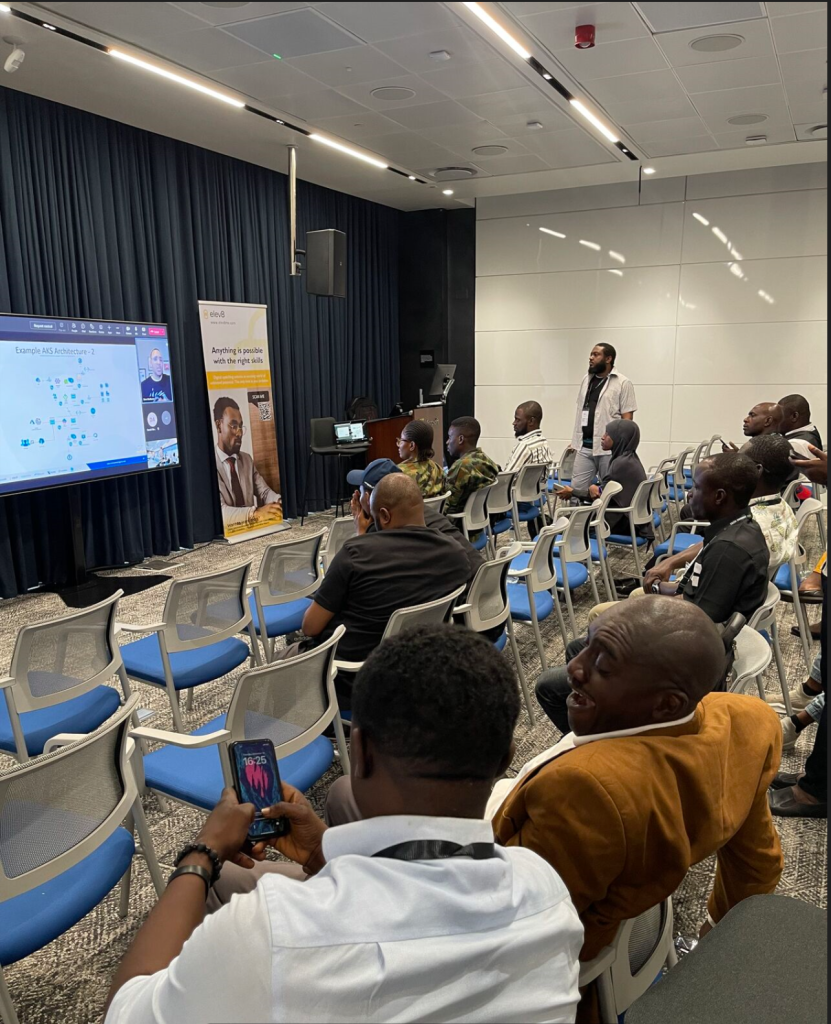
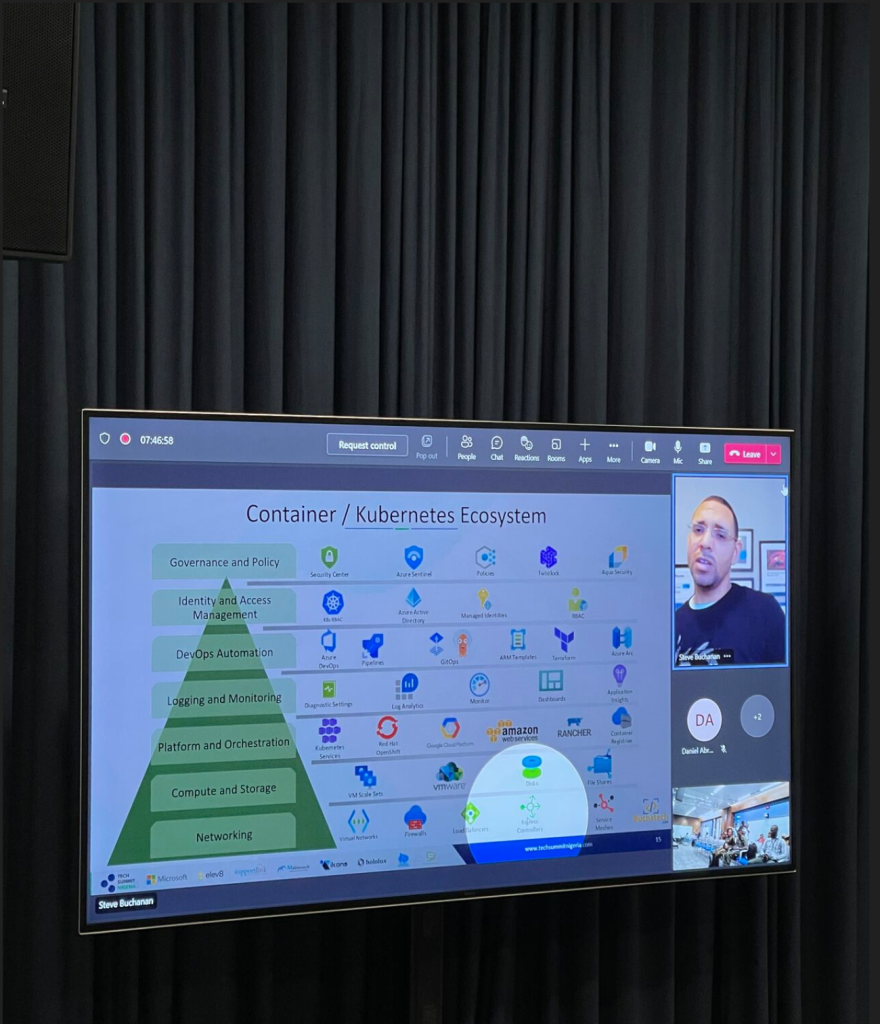
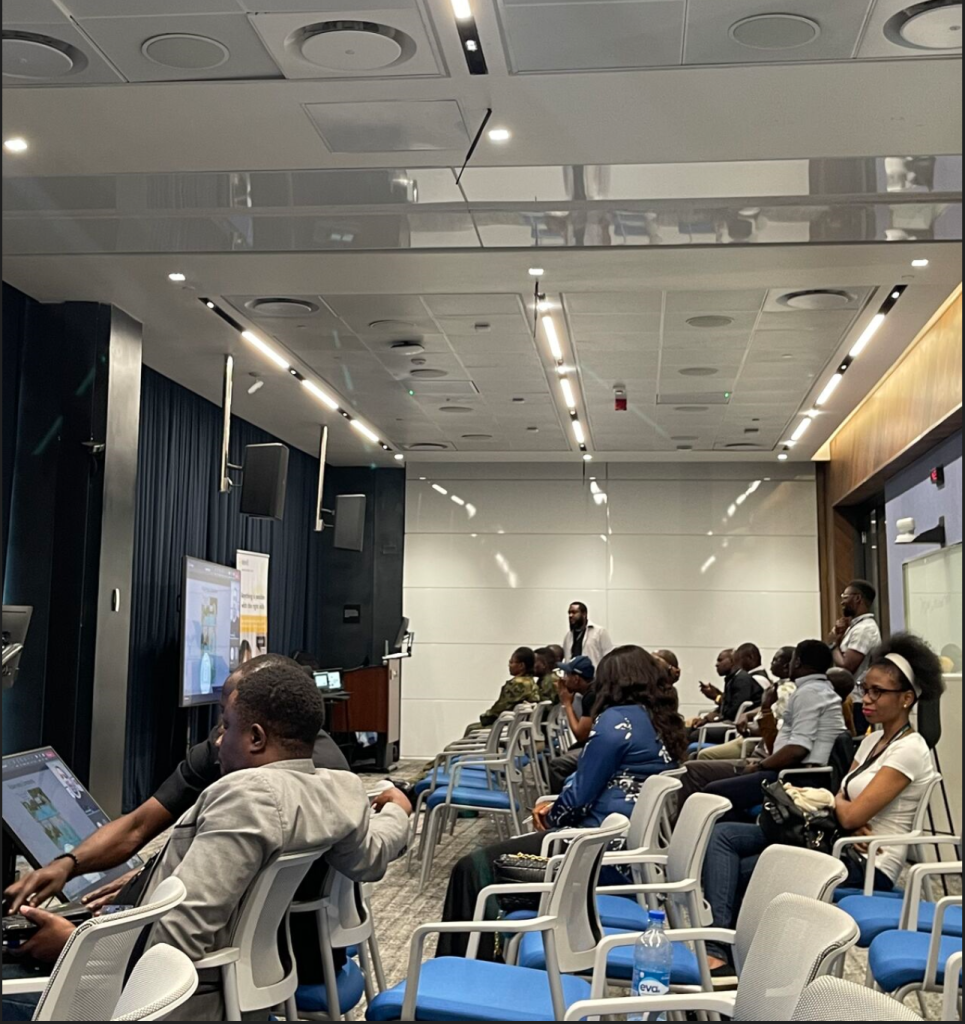
It was a fun session with an engaged audience! Here are some pictures from the session.

If you missed my session you can watch the replay here:

Read more

Featured on RunAsRadio Podcast – Terraform vs Bicep/ARM

Recently I was a guest on another podcast! This one is RunAsRadio.com.

Had a great time chatting with Richard Campbell about Infrastructure As Code and comparing Terraform with Azure ARM Templates & the new Bicep language. Check it out here:

http://runasradio.com/Shows/Show/740

Read more

Setup CI/CD pipeline with VSTS & Azure Stack

We all know that DevOps brings together people, processes, and technology. In the Microsoft DevOps world A large part of the technology piece is utilizing Visual Studio Team Services (VSTS) for continuous deployment of workloads to Azure.

Microsoft launched their Hybrid Cloud on July 10th 2017. Azure Stack is the secret sauce of Microsoft’s the Hybrid Cloud. Microsoft’s offering is the only one true Hybrid Cloud in the market bringing Azure to on-premises data centers.

As Microsoft continues to move their Hybrid Cloud forward the DevOps integration and capabilities we have for Azure extend to Azure Stack. Again I was fortunate to participate in a preview of the VSTS integration with Azure Stack. I was happy to see Microsoft putting a priority on this functionality because DevOps on Azure Stack is a HUGE need. Cloud is often the catalyst to helping organizations adopt a DevOps culture fostering digital transformation. Some organizations not being able to put all workloads in public cloud Azure Stack is a good way for them to get the same cloud capabilities on-premises DevOps integration being one of them. The setup and integration between VSTS and Azure Stack is working nicely. The team at Microsoft has given me permission to share about this topic via my blog.

In this blog post I am going to cover setting up VSTS to work with Azure and setting up a continuous-integration and-continuous deployment (CI/CD) pipeline to Azure Stack. With Microsoft DevOps you can utilize the pieces of VSTS that make sense for you to use leaving the control up to you. Through VSTS you can use many other DevOps tools such as Jenkins, Octopus deploy, GitHub, Bitbucket etc into your pipeline making Azure Stack just as flexible as Azure is. Let’s Jump in!

Steps to prep Azure Stack for Visual Studio Team Services (VSTS)

#1 Ensure you have installed the Azure Stack PowerShell and Azure PowerShell modules.

Details can be found here:

https://docs.microsoft.com/en-us/azure/azure-stack/azure-stack-powershell-install

#2 Add the Azure Stack environment using the following syntax

# Navigate to the downloaded folder and import the **Connect** PowerShell module

Set-ExecutionPolicy RemoteSigned

Import-Module PATH\AzureStack.Connect.psm1

# Register an AzureRM environment that targets your Azure Stack instance

Add-AzureRMEnvironment `

-Name “AzureStackAdmin” `

-ArmEndpoint “https://adminmanagement.local.azurestack.external

# Set the GraphEndpointResourceId value

Set-AzureRmEnvironment `

-Name “AzureStackAdmin” `

-GraphAudience “https://graph.windows.net/

# Get the Active Directory tenantId that is used to deploy Azure Stack

$TenantID = Get-AzsDirectoryTenantId `

-AADTenantName “YOURDOMAIN.onmicrosoft.com” `

-EnvironmentName “AzureStackAdmin”

# Sign in to your environment

Login-AzureRmAccount `

-EnvironmentName “AzureStackAdmin” `

-TenantId $TenantID

NOTE: You will need the environment name and the tenant ID for the next script.

#3 Create SPN

Original SPN creation script can be found here:

https://github.com/Microsoft/vsts-rm-documentation/blob/master/Azure/SPNCreation.ps1

Documentation on creating an SPN can be found here:

https://www.visualstudio.com/en-us/docs/build/concepts/library/service-endpoints#sep-azure-rm

Below I will display the script I used. Note that you will need the following parameters for the script:

$subscriptionName

“Enter Azure Stack Subscription name. You need to be Subscription Admin to execute the script”)]

$password

“Provide a password for SPN application that you would create”

$environmentName

“Provide Azure Stack environment name for your subscription”

$AzureStackTenantID

“Provide tenant ID from when Azure Stack enviroment was added”

EXAMPLE:

.\CreateSPN.ps1 -subscriptionName “Default Provider Subscription” -password PASSWORDHERE -environmentName AzureStackAdmin -AzureStackTenantID ID HERE

Here is the script I used that you can run:

param

(

[Parameter(Mandatory=$true, HelpMessage=”Enter Azure Stack Subscription name. You need to be Subscription Admin to execute the script”)]

[string] $subscriptionName,

[Parameter(Mandatory=$true, HelpMessage=”Provide a password for SPN application that you would create”)]

[string] $password,

[Parameter(Mandatory=$false, HelpMessage=”Provide a SPN role assignment”)]

[string] $spnRole = “owner”,

[Parameter(Mandatory=$false, HelpMessage=”Provide Azure Stack environment name for your subscription”)]

[string] $environmentName,

[Parameter(Mandatory=$false, HelpMessage=”Provide tenant ID from when Azure Stack enviroment was added”)]

[string] $AzureStackTenantID

)

#Initialize

$ErrorActionPreference = “Stop”

$VerbosePreference = “SilentlyContinue”

$userName = $env:USERNAME

$newguid = [guid]::NewGuid()

$displayName = [String]::Format(“VSO.{0}.{1}”, $userName, $newguid)

$homePage = “http://” + $displayName

$identifierUri = $homePage

#Initialize subscription

$isAzureModulePresent = Get-Module -Name AzureRM* -ListAvailable

if ([String]::IsNullOrEmpty($isAzureModulePresent) -eq $true)

{

Write-Output “Script requires AzureRM modules to be present. Obtain AzureRM from https://github.com/Azure/azure-powershell/releases. Please refer https://github.com/Microsoft/vsts-tasks/blob/master/Tasks/DeployAzureResourceGroup/README.md for recommended AzureRM versions.” -Verbose

return

}

Import-Module -Name AzureRM.Profile

Write-Output “Provide your credentials to access Azure subscription $subscriptionName” -Verbose

Login-AzureRmAccount -SubscriptionName $subscriptionName -EnvironmentName $environmentName -TenantId $AzureStackTenantID

$azureSubscription = Get-AzureRmSubscription -SubscriptionName $subscriptionName

$connectionName = $azureSubscription.SubscriptionName

$tenantId = $azureSubscription.TenantId

$id = $azureSubscription.SubscriptionId

#Create a new AD Application

Write-Output “Creating a new Application in AAD (App URI – $identifierUri)” -Verbose

$azureAdApplication = New-AzureRmADApplication -DisplayName $displayName -HomePage $homePage -IdentifierUris $identifierUri -Password $password -Verbose

$appId = $azureAdApplication.ApplicationId

Write-Output “Azure AAD Application creation completed successfully (Application Id: $appId)” -Verbose

#Create new SPN

Write-Output “Creating a new SPN” -Verbose

$spn = New-AzureRmADServicePrincipal -ApplicationId $appId

$spnName = $spn.ServicePrincipalName

Write-Output “SPN creation completed successfully (SPN Name: $spnName)” -Verbose

#Assign role to SPN

Write-Output “Waiting for SPN creation to reflect in Directory before Role assignment”

Start-Sleep 20

Write-Output “Assigning role ($spnRole) to SPN App ($appId)” -Verbose

New-AzureRmRoleAssignment -RoleDefinitionName $spnRole -ServicePrincipalName $appId

Write-Output “SPN role assignment completed successfully” -Verbose

#Print the values

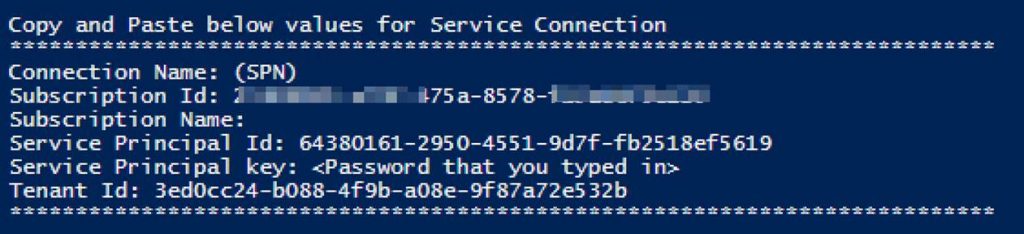
Write-Output “`nCopy and Paste below values for Service Connection” -Verbose

Write-Output “***************************************************************************”

Write-Output “Connection Name: $connectionName(SPN)”

Write-Output “Subscription Id: $id”

Write-Output “Subscription Name: $connectionName”

Write-Output “Service Principal Id: $appId”

Write-Output “Service Principal key: <Password that you typed in>”

Write-Output “Tenant Id: $tenantId”

Write-Output “***************************************************************************”

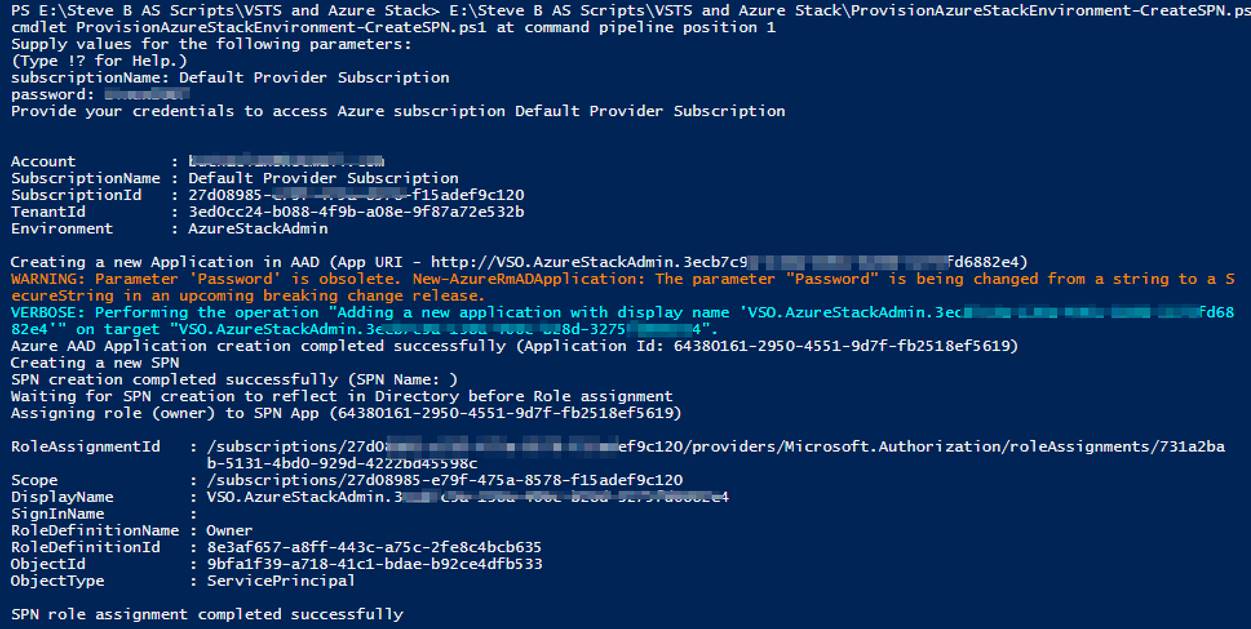
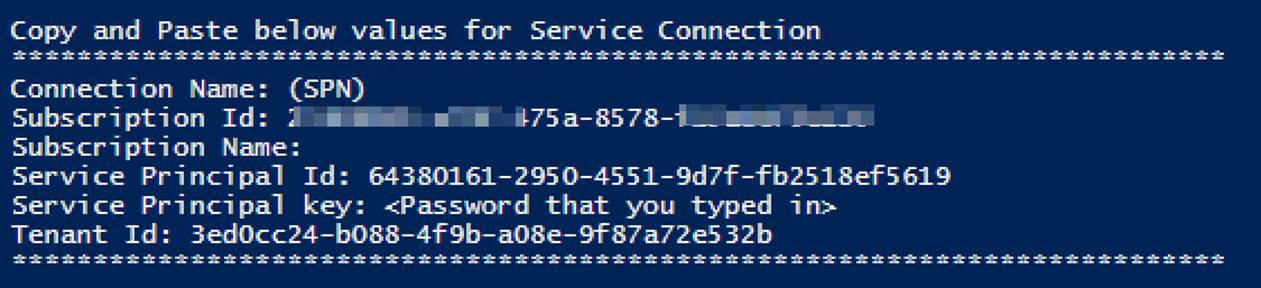
Output should be similar to this:
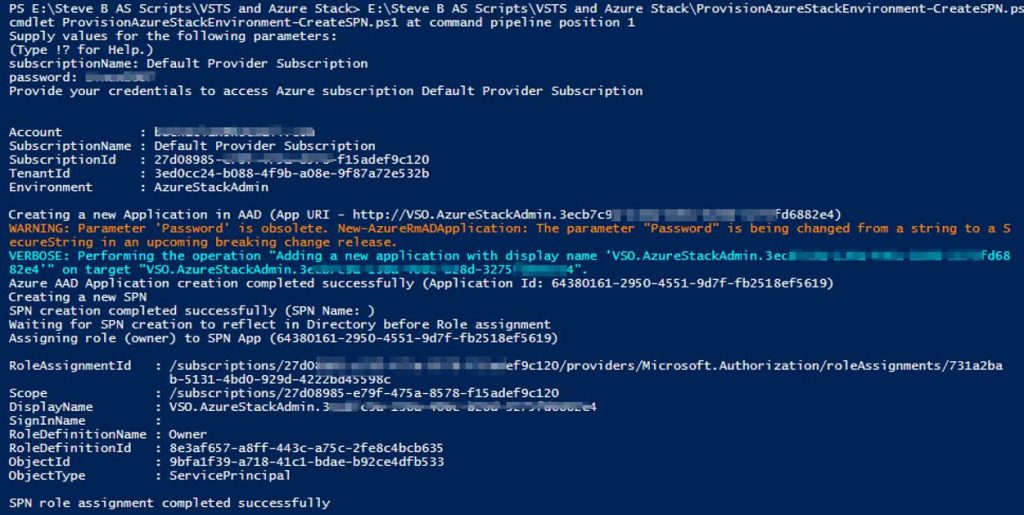
You will use information from the Service Connection output in the next step.

Steps to configure Azure Stack as a Service Endpoint in VSTS

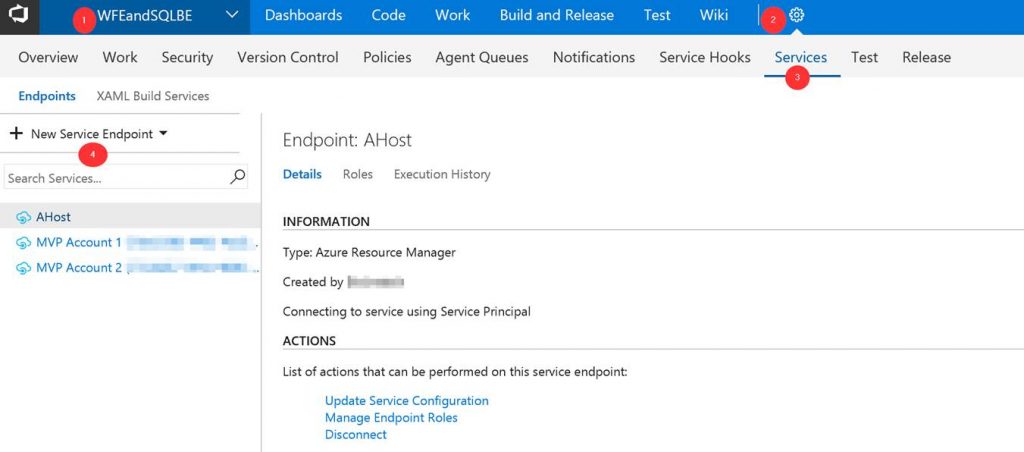
Log into your VSTS account at visalstudio.com

Navigate to one of your projects.

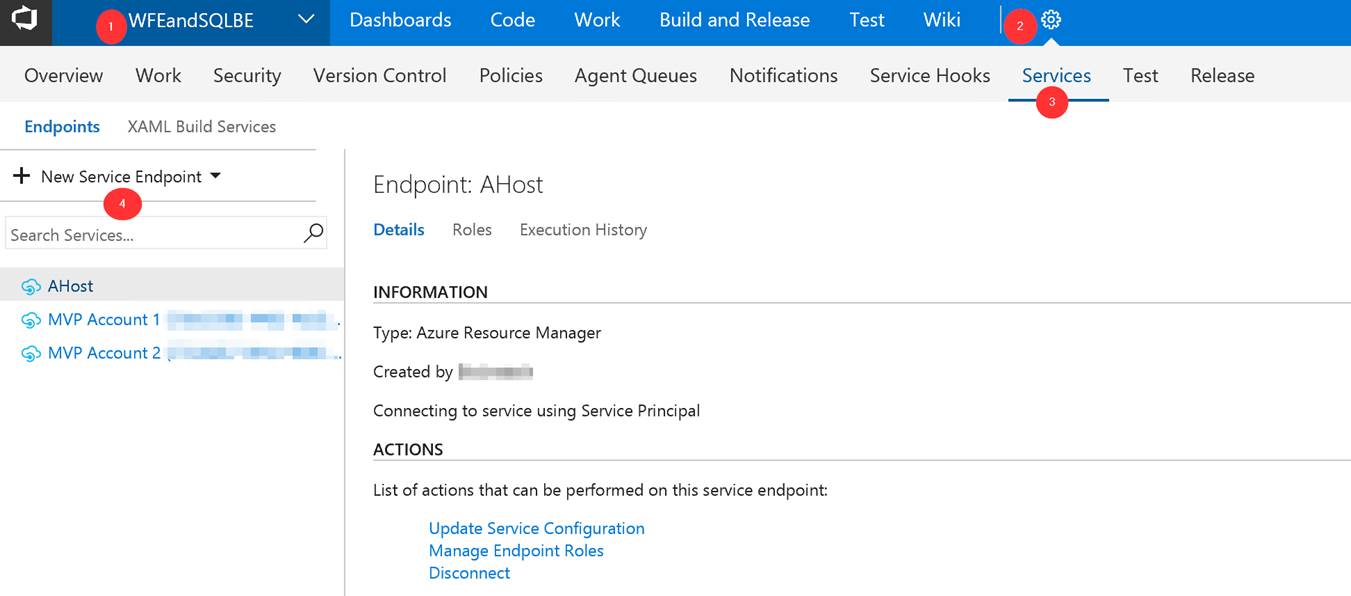
Go into Settings.

Click on Services.

Click on New Service Endpoint
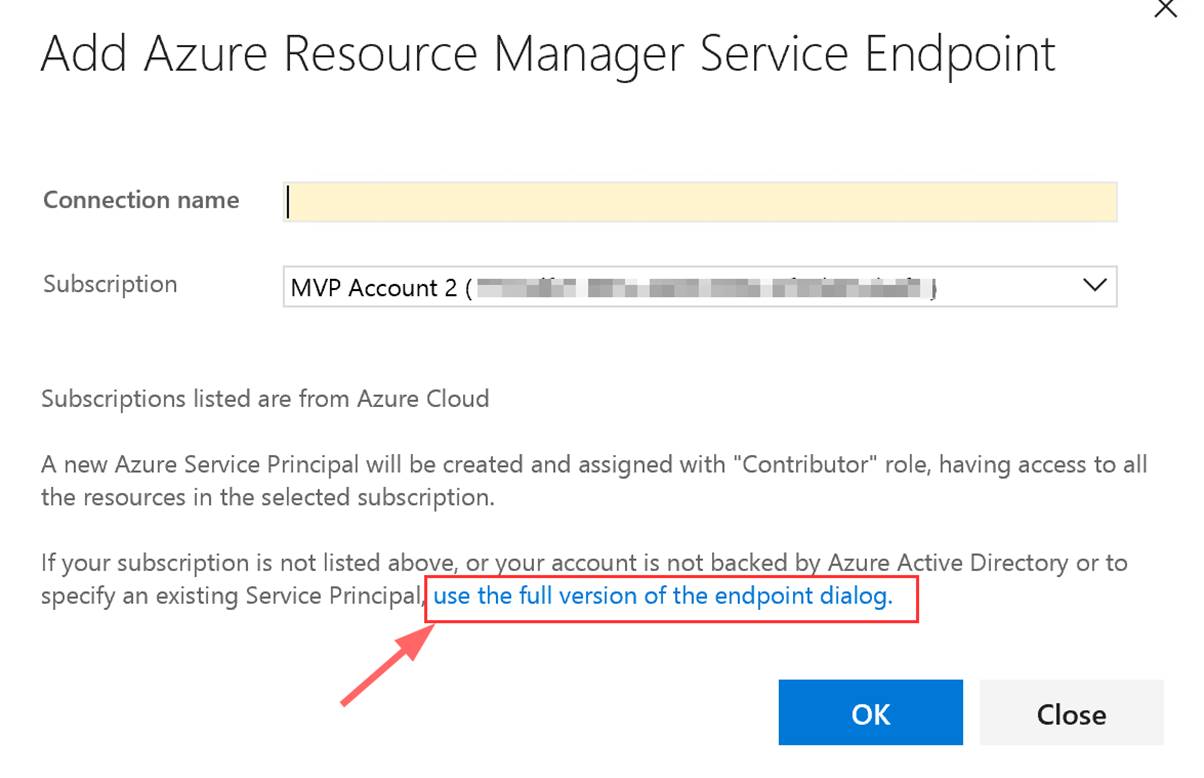
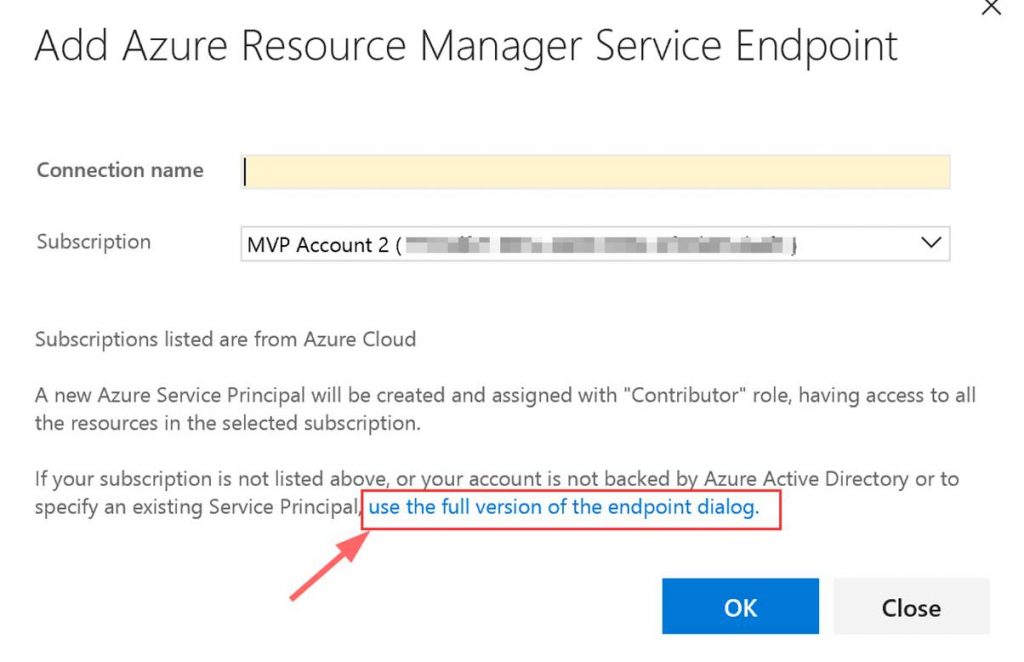
A window will pop up. Click on “use full version of the endpoint dialog.”
Next input the needed data. This data comes from the Service Connection info that you copied.
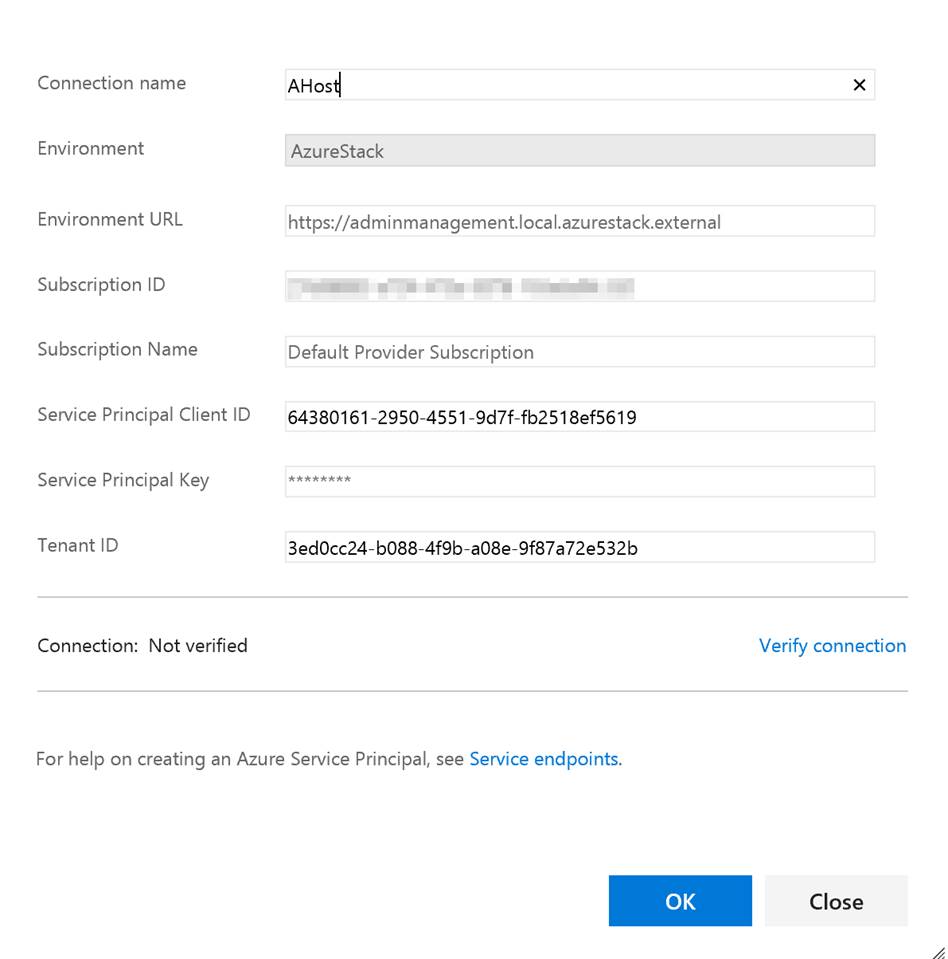
You can put whatever you want in the Connection name and the Subscription Name. Note do not verify the connection. It will not succeed as VSTS cannot access your private Azure Stack yet. Click OK when done.

Setup build agent on Azure Stack host

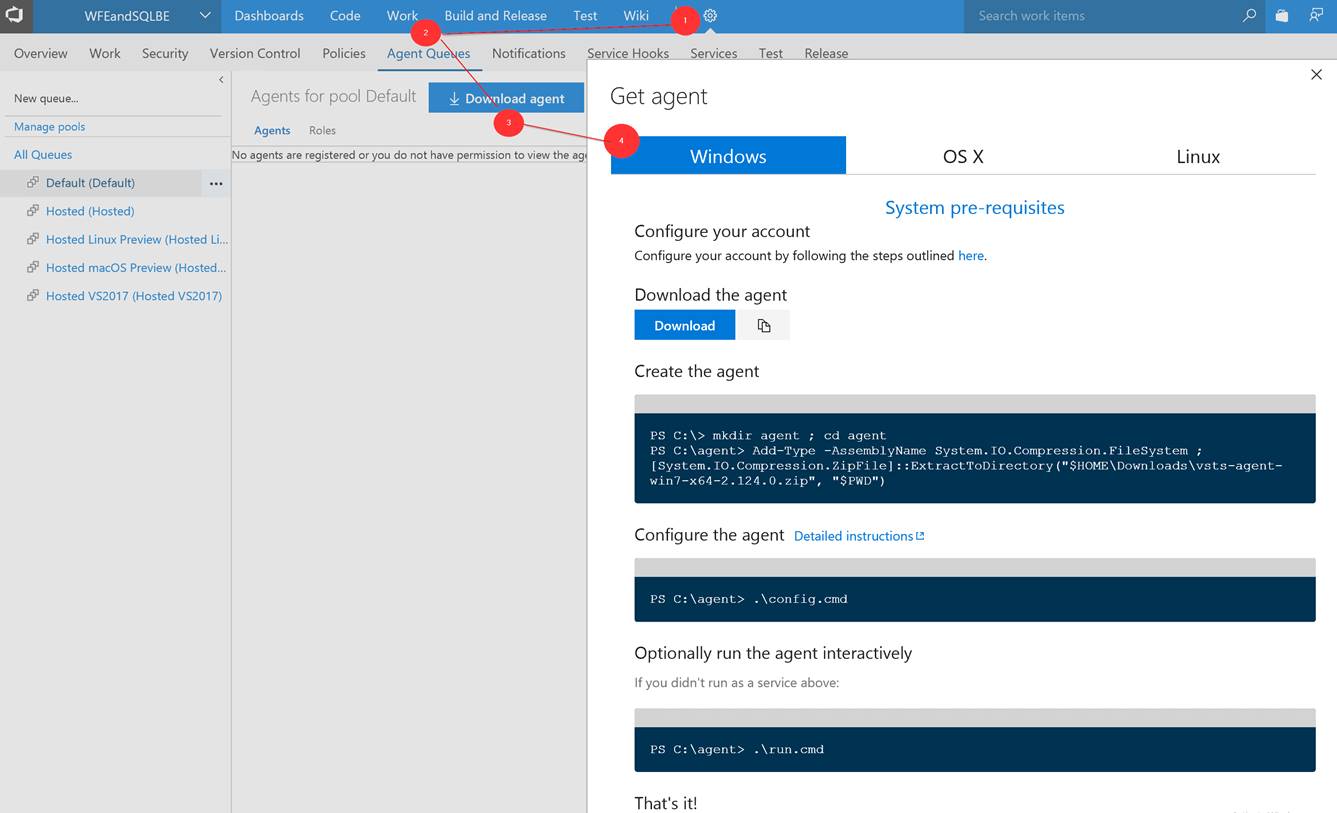
Next you need to setup the build agent on the Azure Stack host. (Note: In this post I am using the ASDK.) From within VSTS download the Windows agent. Extract the download to a local folder.
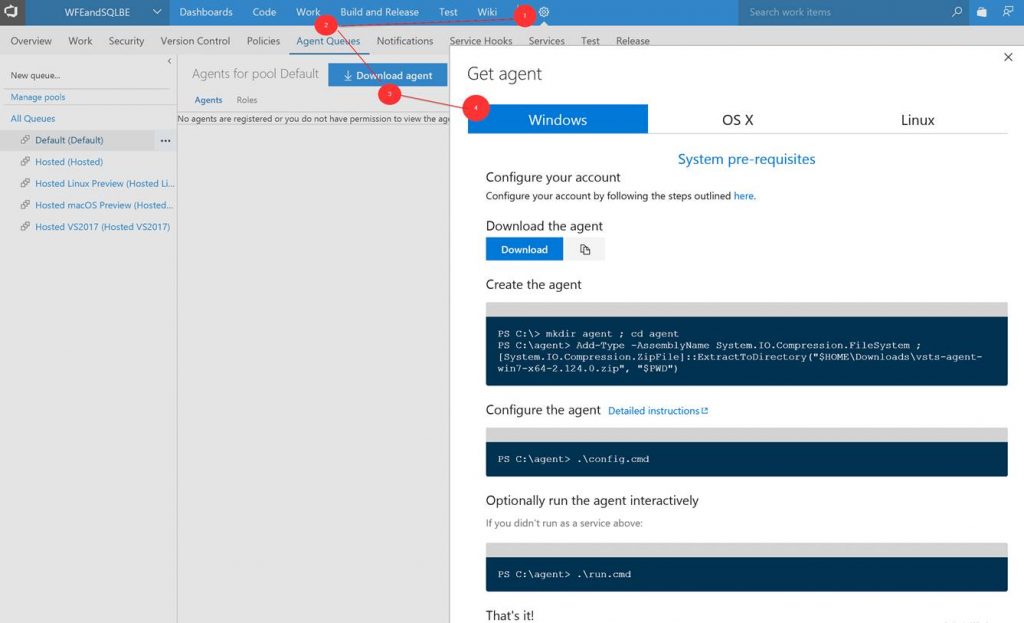
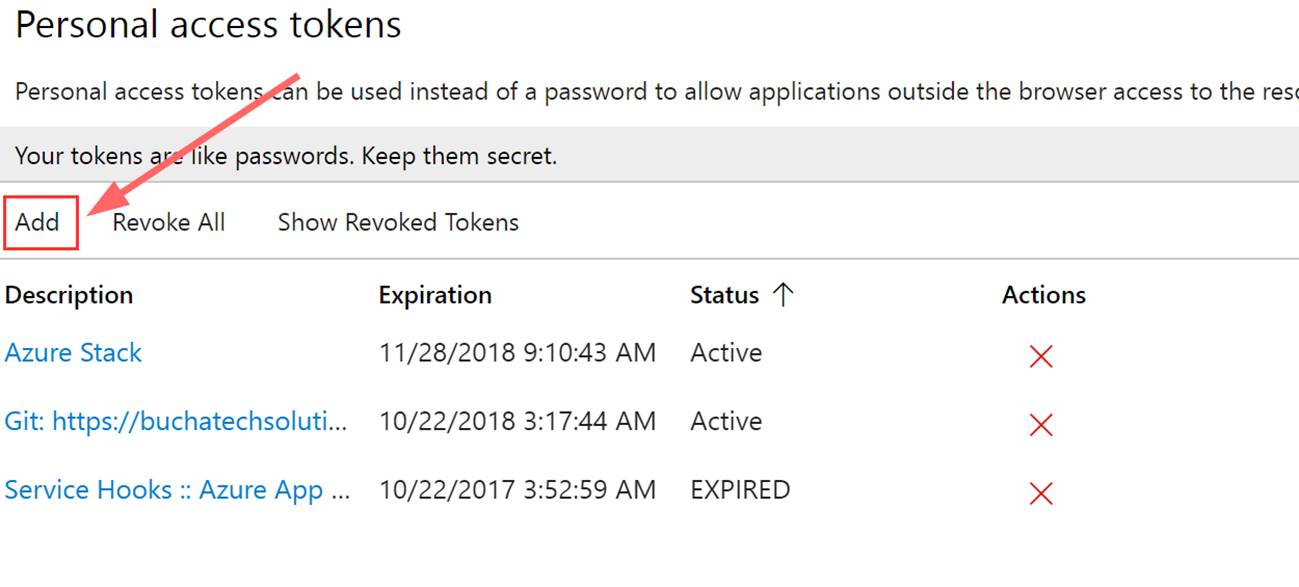
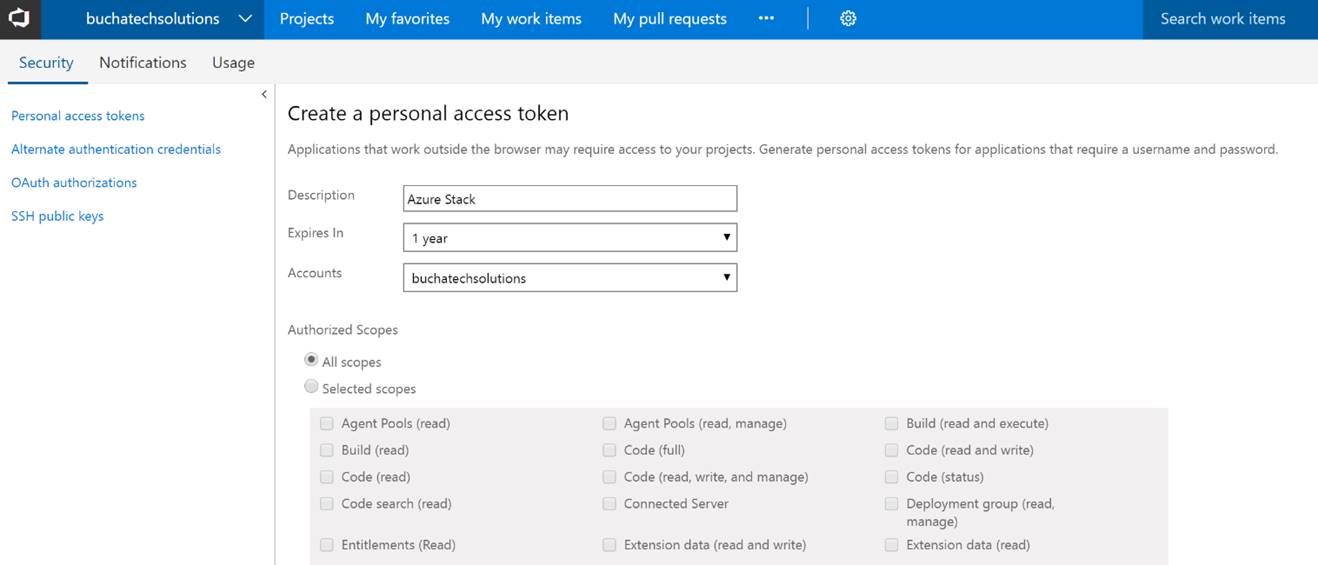
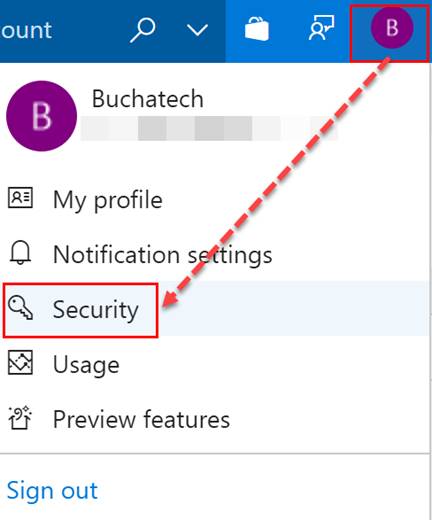
Go to Security under your profile in VSTS.
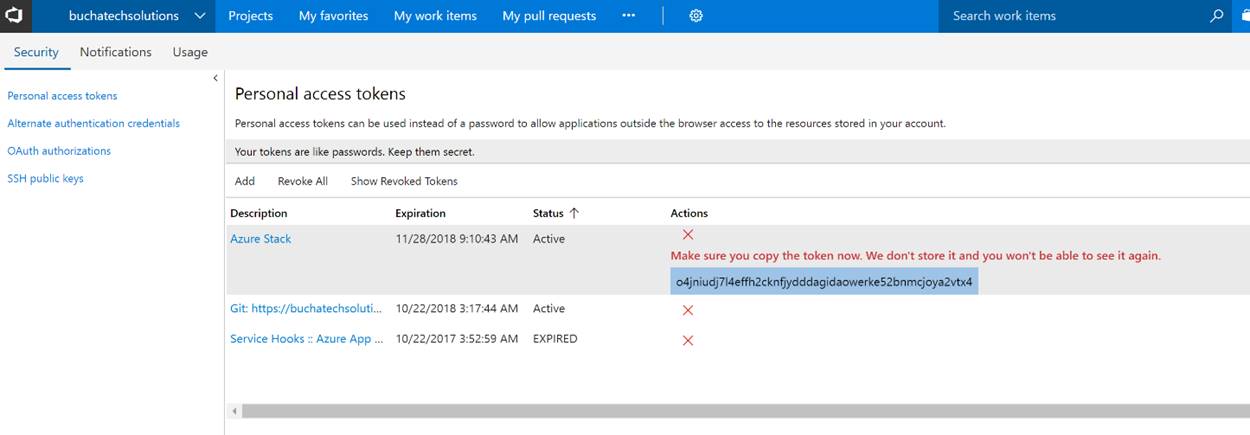
Next add a Personal access token (PAT) for Azure Stack.
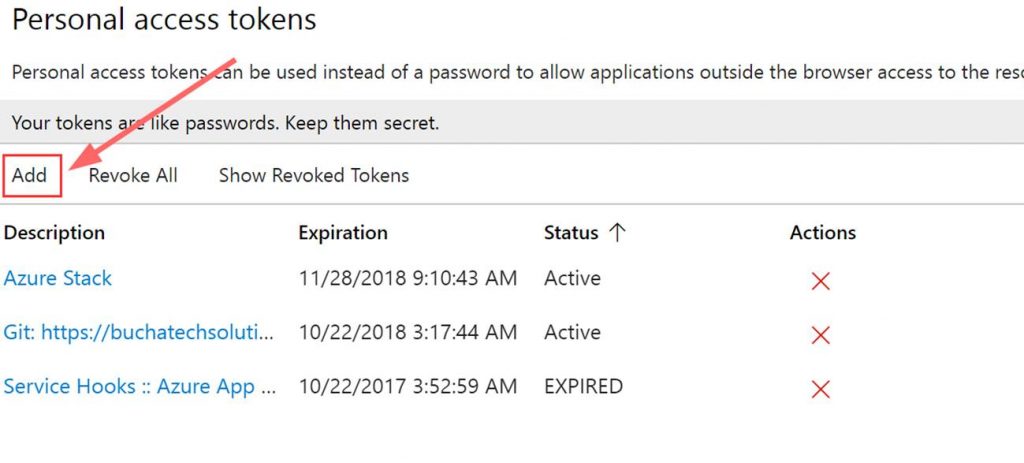
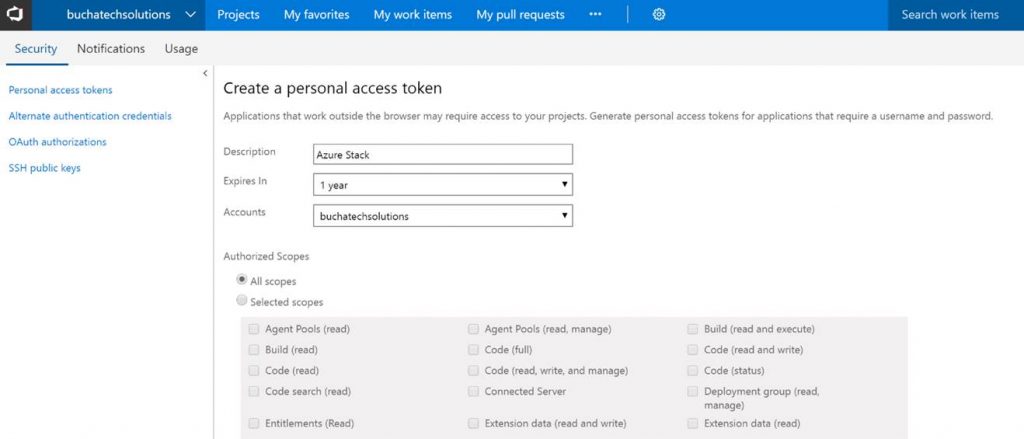
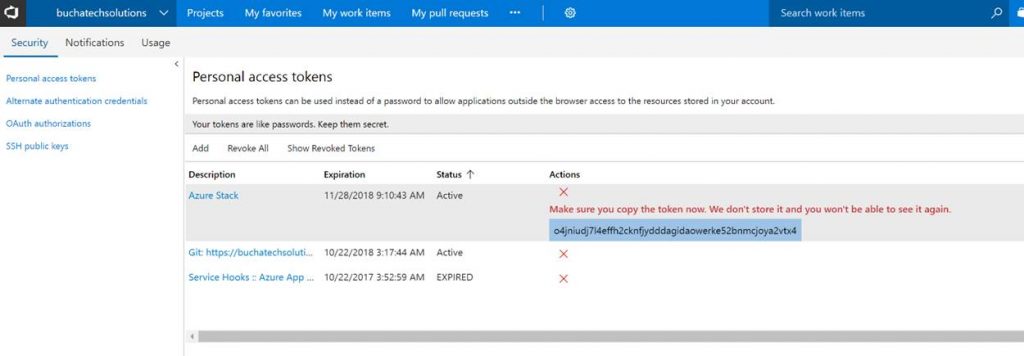
Copy the token. Note it will not be shown again ever after you leave this screen.
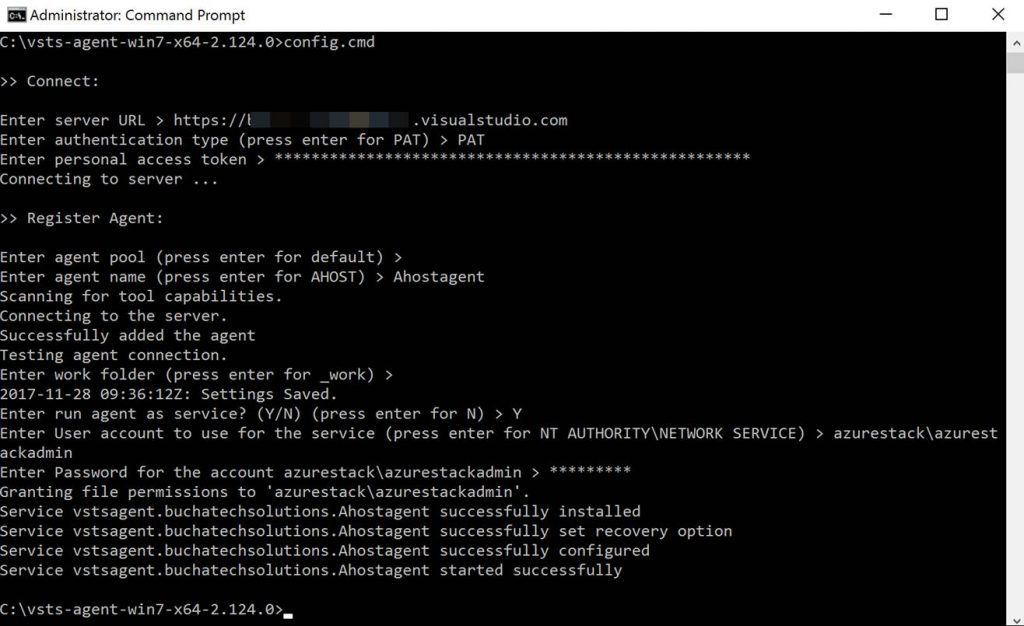
In the folder with the extracted build agent you will see the following. We need to run the run.cmd file from an elevated command prompt.

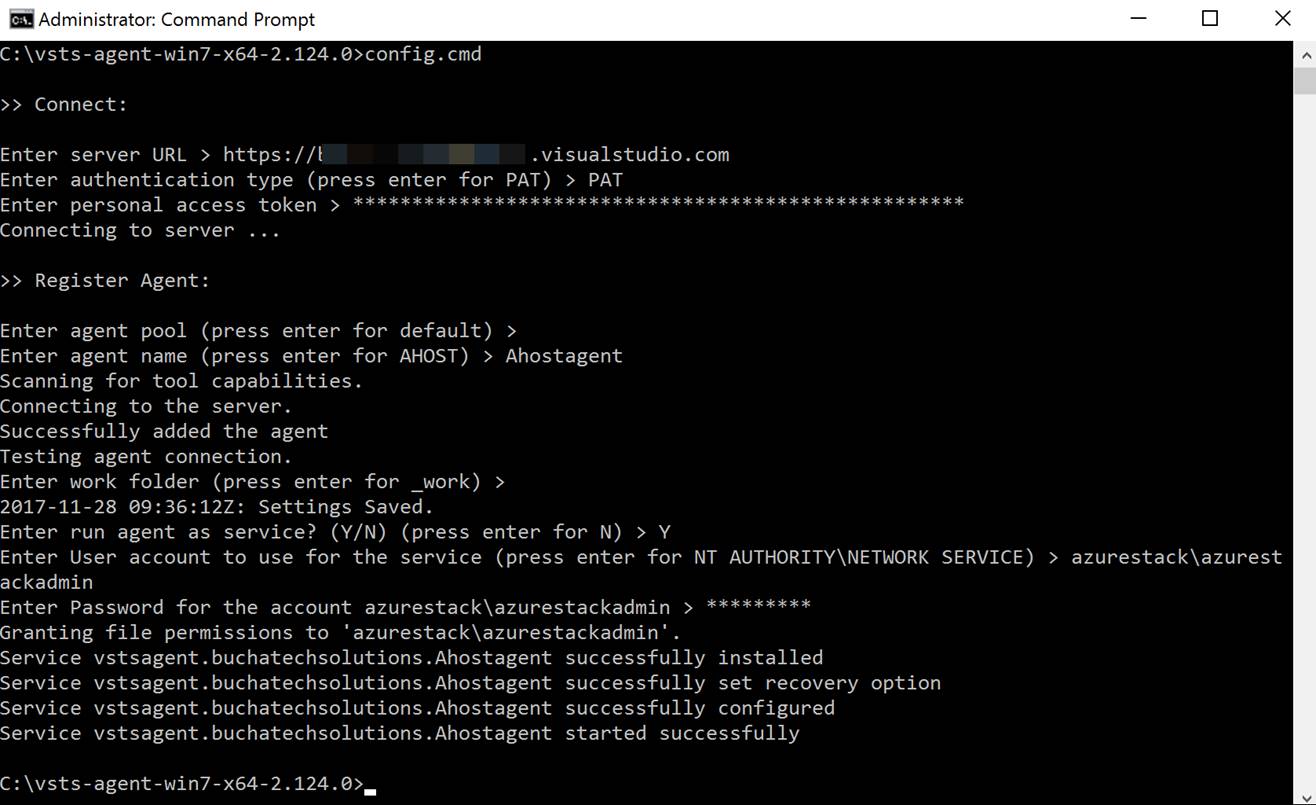
Here is a screenshot of running the run.cmd. I recommend deploying the build agent as a service. You will use your personal access token (PAT) here and the azure stack admin account.
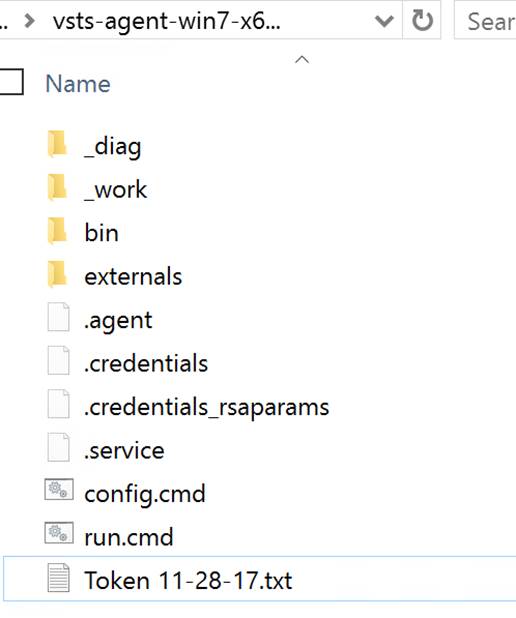
After the run.cmd finished the folder with the extracted contents should look like the following:
You can now see the agent in VSTS.
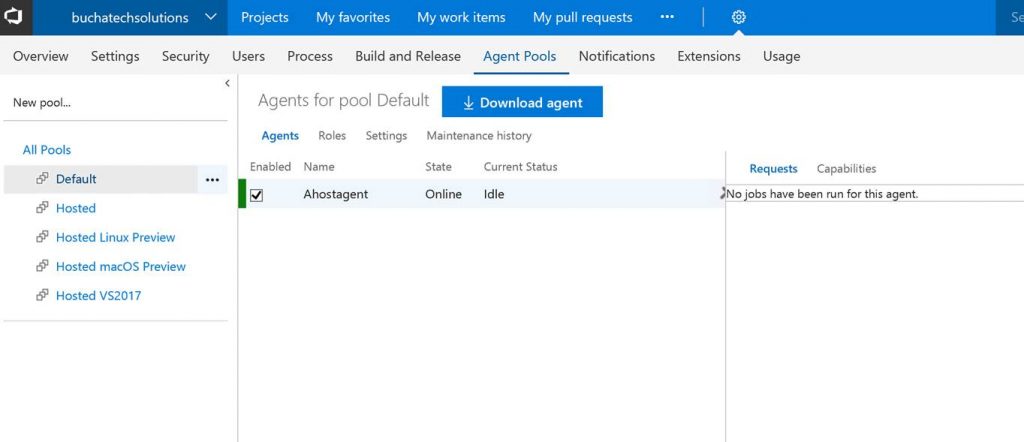
That’s it for the setup for connecting VSTS to Azure Stack. Next let’s look at setting up a continuous-integration and-continuous deployment (CI/CD) pipeline for VM-deployment to Azure Stack.


THE BUILD

What I cover here is focused on infrastructure as code (IaC) using ARM templates. If you need to set up CI/CD to Azure Stack for Web Apps, Mobile Apps, Containers, etc the process is the same as it is on Azure with the only difference being that you point to Azure Stack. Also note that in this post I am using the ASDK not multi-node.

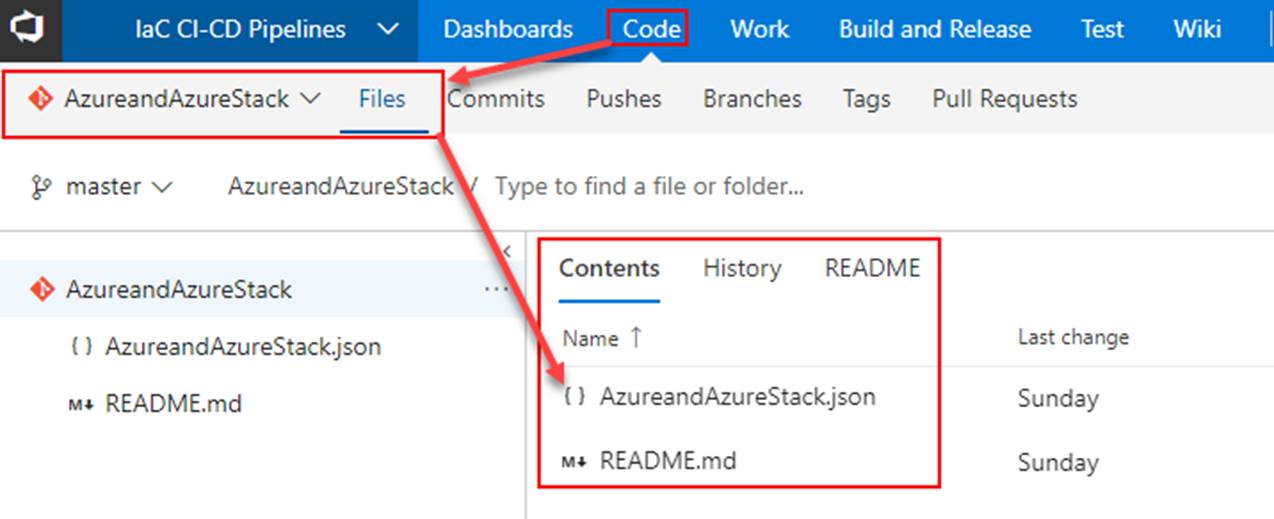
Within VSTS create a new repository and place your ARM template in it.
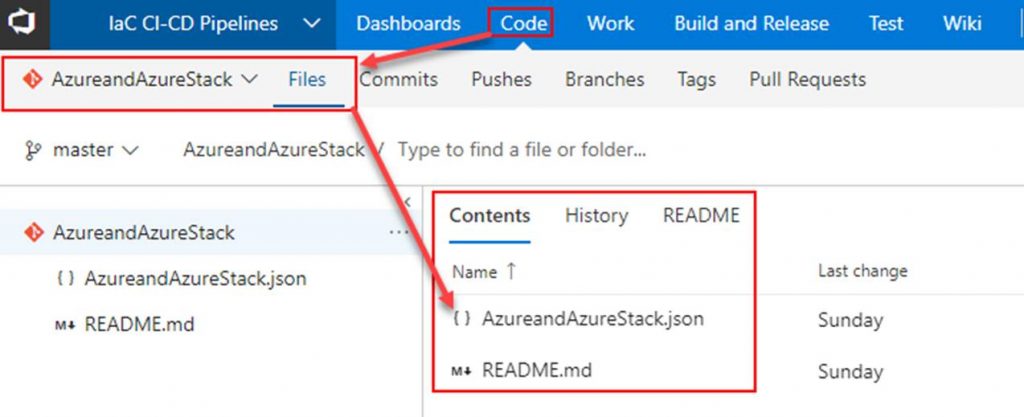
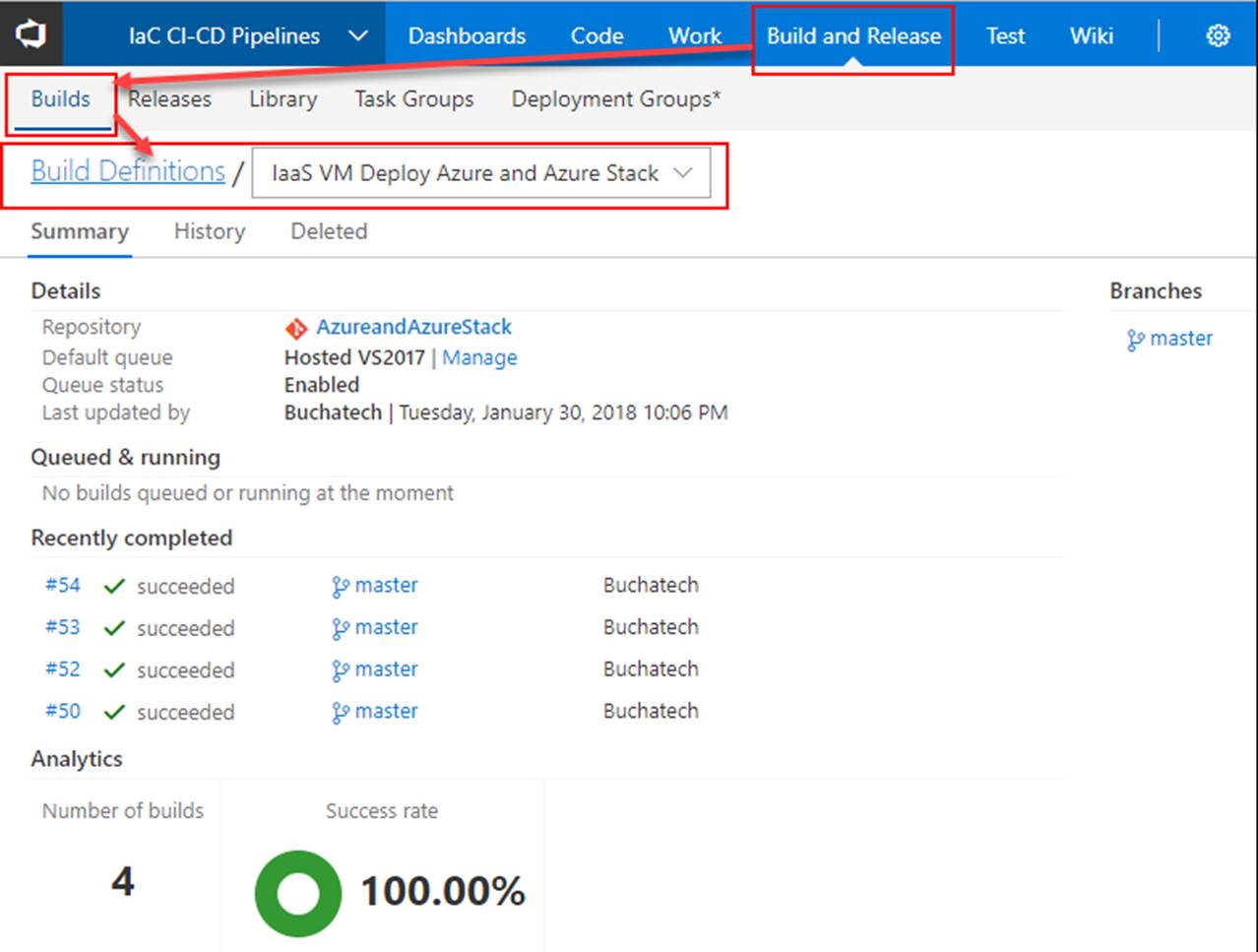
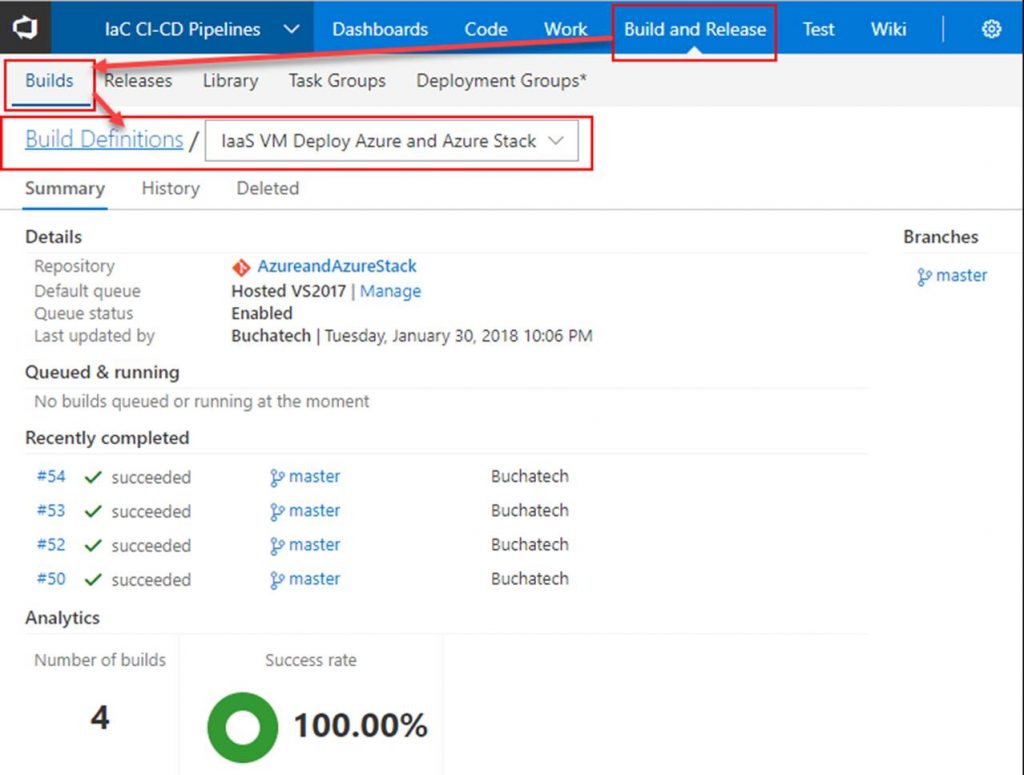
Next click on Build and Release. Create a new Build Definition.
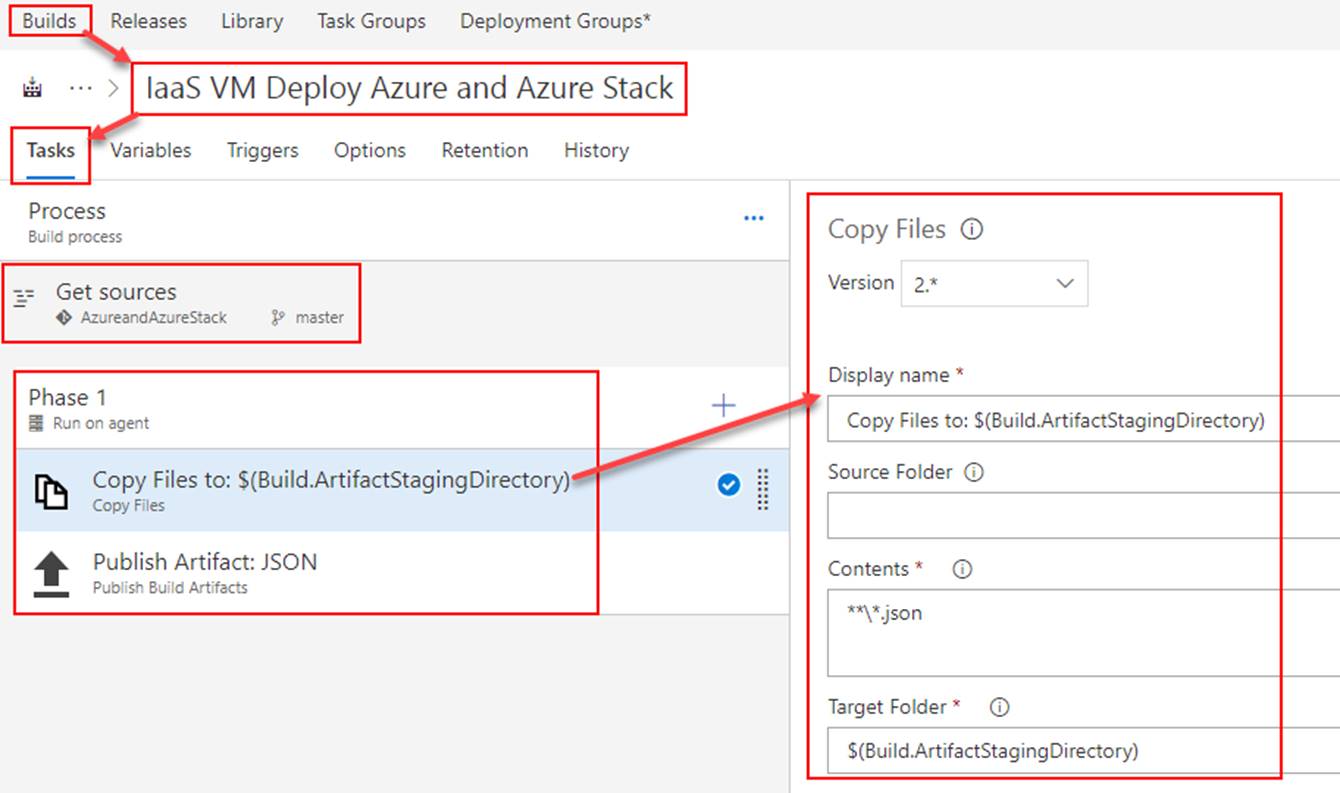
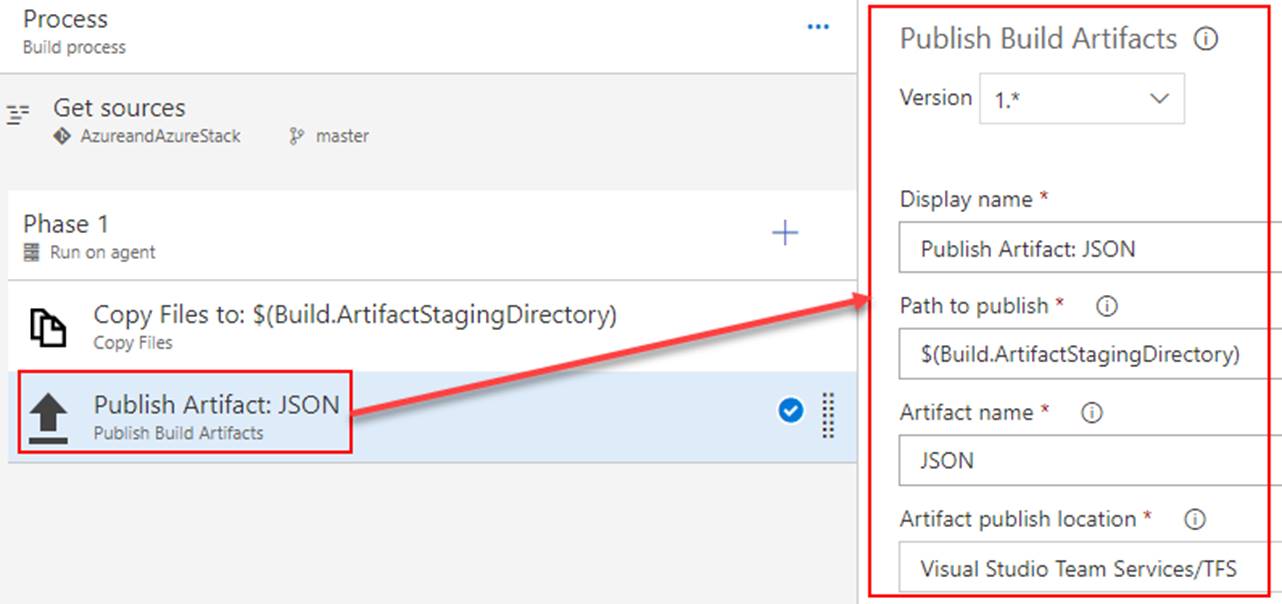
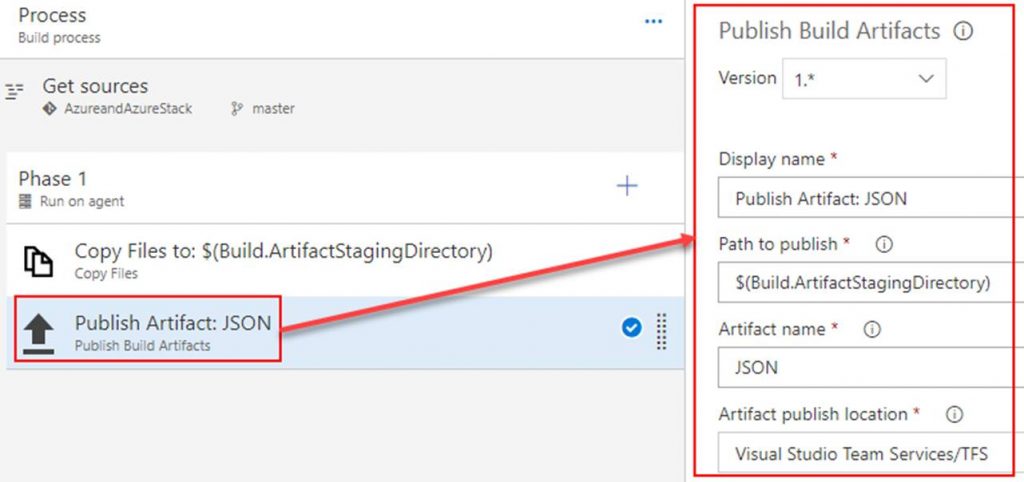
In the build definition. Point the Get sources to the repository you just created. Add 2 tasks under Phase 1. The first task will copy the ARM template to the build staging directory. The second task will publish the ARM template so that a release definition can pick it up. Both tasks are shown in the following screenshots.

Copy Files to task
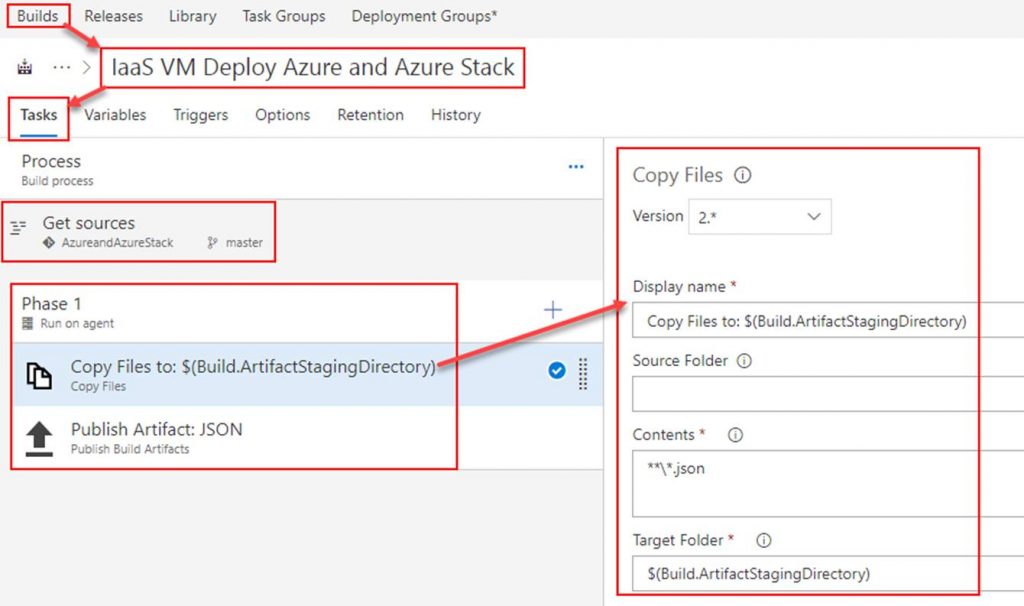
Publish Artifact task
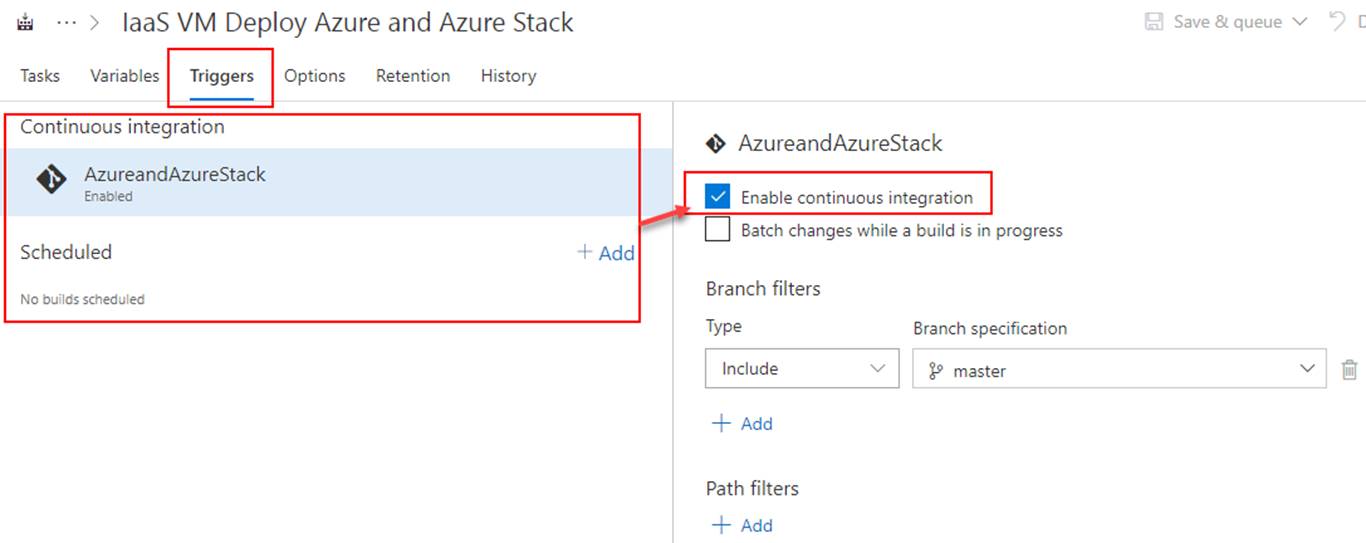
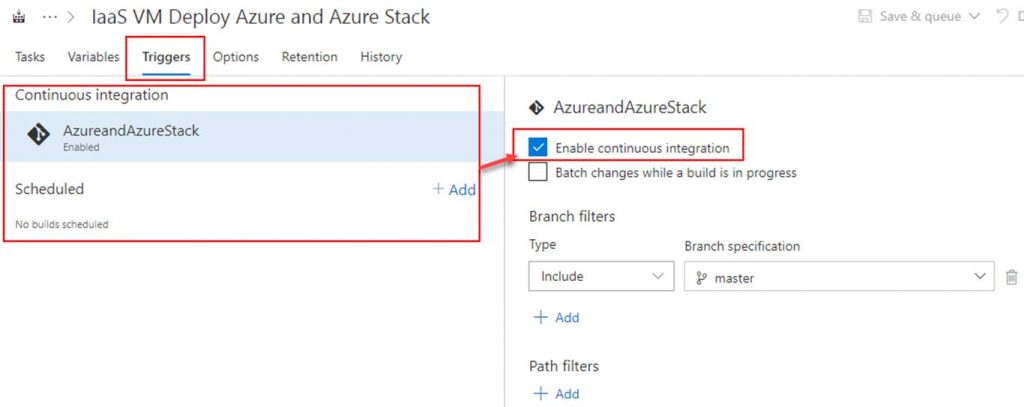
OPTIONAL: To setup continuous integration click on Triggers. Here you can set a schedule to run the builds or you can click on the repository as shown in the screenshot and then check Enable continuous integration. By checking the box next to Enable continuous integration it tells VSTS that anytime content in the repo is changed to run a build.
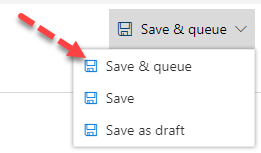
Click on Save & queue. This will start the build.
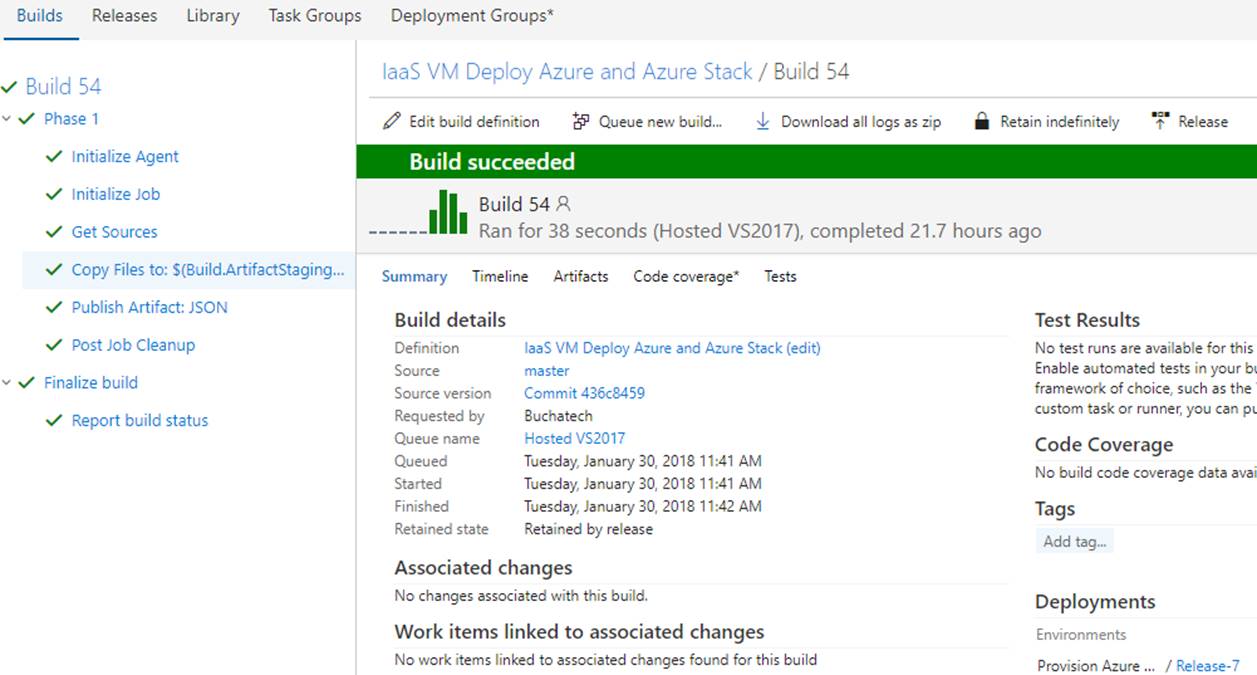
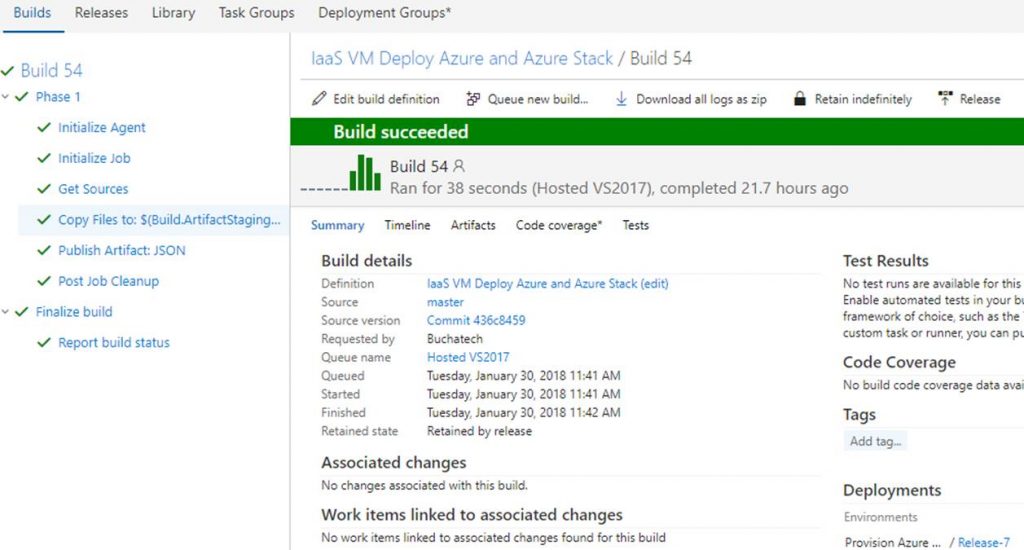
The build will start. As long as everything is setup properly within your build it will succeed as shown in the following Screenshot.
That’s all for our build. Next up we need to create a release definition (RD) pipeline. The RD will take the build artifacts and deploy to an environment/s you specify.

Read more